Academic Tutorials


English | French | Portugese | Dutch | Italian
Google

on-line

Haupt Quellenprogramme E-Bücher Downloads Mit uns in Verbindung treten Über uns

HTML Tutorials
HTML Tutorial
XHTML Tutorial
CSS Tutorial
TCP/IP Tutorial
XML Tutorials
XML Tutorial
XSL Tutorial
XSLT Tutorial
DTD Tutorial
Schema Tutorial
XForms Tutorial
XSL-FO Tutorial
XML DOM Tutorial
XLink Tutorial
XQuery Tutorial
XPath Tutorial
XPointer Tutorial
RDF Tutorial
SOAP Tutorial
WSDL Tutorial
RSS Tutorial
WAP Tutorial
Web Services Tutorial
Browser Scripting
JavaScript Tutorial
VBScript Tutorial
AJAX Tutorial
DHTML Tutorial
HTML DOM Tutorial
WMLScript Tutorial
E4X Tutorial
Server Scripting
ASP Tutorial
PHP Tutorial
PERL Tutorial
SQL Tutorial
ADO Tutorial
.NET (dotnet)
Microsoft.Net
XML Web Services
ASP.Net
.Net Mobile
C# : C Sharp
ADO.NET
VB.NET
Multimedia
SVG Tutorial
Flash Tutorial
Media Tutorial
SMIL Tutorial
Web Building
Web Browsers
Web Hosting
W3C Tutorial
Web Building
Web Quality
Web Semantic
Web Careers
Java Tutorials
Java Tutorial
JSP Tutorial
Servlets Tutorial
Struts Tutorial
EJB Tutorial
JMS Tutorial
JMX Tutorial
Programming Langauges
C Tutorial
C++ Tutorial
Visual Basic Tutorial
Data Structures Using C
Soft Skills
Communication Skills
Time Management
Project Management
Team Work
Leadership Skills
Corporate Communication
Negotiation Skills


JSP Klima

Previous Next


JSP Klima einstellen

Für die Einstellung des JSP Klimas solltest du ein JDK (Java Development Kit) haben.


Setting up the JSP
Download the latest JDK from the following URL:

http://java.sun.com/javase/downloads/index.jsp

Install through the setup.

One of the main problems of new Java developers have is setting the PATH and CLASSPATH.

For Windows 95/98/ME you edit the AUTOEXEC.BAT file with the new PATH and CLASSPATH

set the path and reboot your machine.

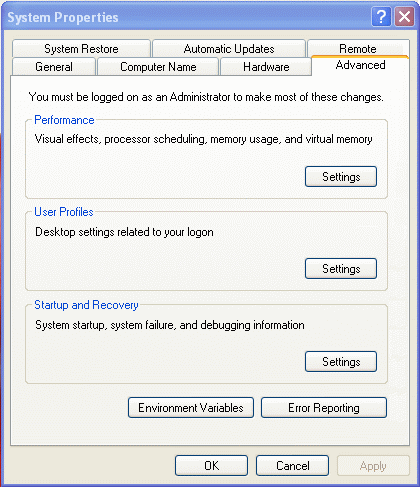
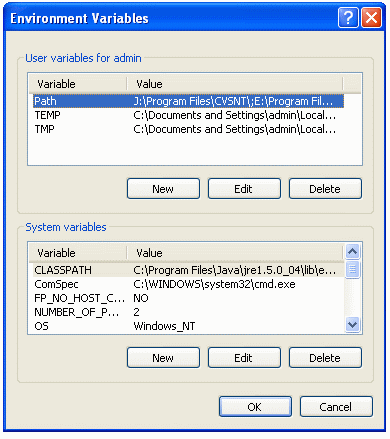
For Windows 2000/XP you edit the environment variables.

(Control Panel -> System -> Environment Variables).

Read the installation instructions properly as it may change with future releases. What you do is add the location of java's bin folder to the Path variable and the classes you want in the CLASSPATH variable


To Download the JSP environment


Download JSP environment from the web.

http://java.sun.com/products/jsp/index.jsp

The preferred option is to download the Tomcat. Tomcat is a free open source JSP and Servlet engine,developed by Apache. Instructions to download Tomcat are given below.

http://tomcat.apache.org/


For Tomcat setup

To download Tomcat (current version 5.),go to the following URL:

http://tomcat.apache.org/download-55.cgi
 
Unzip the file into a directory and set an environment variable TOMCAT_HOME to your main Tomcat directory:

For example,
 
set TOMCAT_HOME=c:\tomcat

To start the server change to the tomcat\bin directory and type:

startup

Open a web browser and in the address box type:

http://localhost:8080/  - this displays the example page.

Place any new JSP files in the "webapps" directory under your installed Tomcat directory.

For example,to run "first.jsp" file,copy the file into the "webapps/ROOT" directory and then open a browser to the address:

http://localhost:8080/myfirst.jsp 
 
This will show you the executed JSP file.


Previous Next

Keywords: jsp tutorial, jsp tutorials, jsp architecture, jsp examples jsp faq, jsp documentation,, jsp overview, jsp projects, jsp introduction, java environment, jsp applications jsp programming, jsp samples, jsp api, jsp specification, jdbc jsp, jsp example, jsp j2ee, jsp beans, jsp project, jsp sun, jsp jboss, jsp code, java jsp, ejb jsp, session jsp jsp xml, jsp database, jsp servlets, jsp object, environment project, jsp tomcat, jsp performance, sample jsp, jsp bean database environment, jsp context, jsp server, jsp servlet, j2ee environment, jsp configuration, jsp applet, mysql jsp, jsp struts, jsp container, jsp connection, jsp weblogic, jsp development, jsp hibernate


HTML Quizes
HTML Quiz
XHTML Quiz
CSS Quiz
TCP/IP Quiz
XML Quizes
XML Quiz
XSL Quiz
XSLT Quiz
DTD Quiz
Schema Quiz
XForms Quiz
XSL-FO Quiz
XML DOM Quiz
XLink Quiz
XQuery Quiz
XPath Quiz
XPointer Quiz
RDF Quiz
SOAP Quiz
WSDL Quiz
RSS Quiz
WAP Quiz
Web Services Quiz
Browser Scripting Quizes
JavaScript Quiz
VBScript Quiz
AJAX Quiz
DHTML Quiz
HTML DOM Quiz
WMLScript Quiz
E4X Quiz
Server Scripting Quizes
ASP Quiz
PHP Quiz
PERL Quiz
SQL Quiz
ADO Quiz
.NET (dotnet) Quizes
Microsoft.Net Quiz
XML Web Services Quiz
ASP.Net Quiz
.Net Mobile Quiz
C# : C Sharp Quiz
ADO.NET Quiz
VB.NET Quiz
Multimedia Quizes
SVG Quiz
Flash Quiz
Media Quiz
SMIL Quiz
Web Building  Quizes
Web Browsers Quiz
Web Hosting Quiz
W3C Quiz
Web Building Quiz
Web Quality Quiz
Web Semantic Quiz
Web Careers Quiz
Java Quizes
Java Quiz
JSP Quiz
Servlets Quiz
Struts Quiz
EJB Quiz
JMS Quiz
JMX Quiz
Programming Langauges Quizes
C Quiz
C++ Quiz
Visual Basic Quiz
Data Structures Using C Quiz
Soft Skills Quizes
Communication Skills Quiz
Time Management Quiz
Project Management Quiz
Team Work Quiz
Leadership Skills Quiz
Corporate Communication Quiz
Negotiation Skills Quiz

Privacy Policy
Copyright © 2003-2008 Vyom Technosoft Pvt. Ltd., All Rights Reserved.