Academic Tutorials


English | French | Portugese | Dutch | Italian
Google

on-line

Haupt Quellenprogramme E-Bücher Downloads Mit uns in Verbindung treten Über uns

HTML Tutorials
HTML Tutorial
XHTML Tutorial
CSS Tutorial
TCP/IP Tutorial
XML Tutorials
XML Tutorial
XSL Tutorial
XSLT Tutorial
DTD Tutorial
Schema Tutorial
XForms Tutorial
XSL-FO Tutorial
XML DOM Tutorial
XLink Tutorial
XQuery Tutorial
XPath Tutorial
XPointer Tutorial
RDF Tutorial
SOAP Tutorial
WSDL Tutorial
RSS Tutorial
WAP Tutorial
Web Services Tutorial
Browser Scripting
JavaScript Tutorial
VBScript Tutorial
AJAX Tutorial
DHTML Tutorial
HTML DOM Tutorial
WMLScript Tutorial
E4X Tutorial
Server Scripting
ASP Tutorial
PHP Tutorial
PERL Tutorial
SQL Tutorial
ADO Tutorial
.NET (dotnet)
Microsoft.Net
XML Web Services
ASP.Net
.Net Mobile
C# : C Sharp
ADO.NET
VB.NET
Multimedia
SVG Tutorial
Flash Tutorial
Media Tutorial
SMIL Tutorial
Web Building
Web Browsers
Web Hosting
W3C Tutorial
Web Building
Web Quality
Web Semantic
Web Careers
Java Tutorials
Java Tutorial
JSP Tutorial
Servlets Tutorial
Struts Tutorial
EJB Tutorial
JMS Tutorial
JMX Tutorial
Programming Langauges
C Tutorial
C++ Tutorial
Visual Basic Tutorial
Data Structures Using C
Soft Skills
Communication Skills
Time Management
Project Management
Team Work
Leadership Skills
Corporate Communication
Negotiation Skills


SVG Beispiel
Previous Next


SVG wird in XML Format geschrieben


SVG Beispiel

Das folgende Beispiel ist ein Beispiel einer einfachen SVG Akte

<?xml version="1.0" standalone="no"?>
<!DOCTYPE svg PUBLIC "-//W3C//DTD SVG 1.1//EN"
"http://www.w3.org/Graphics/SVG/1.1/DTD/svg11.dtd">
<svg width="100%" height="100%" version="1.1" xmlns="http://www.w3.org/2000/svg">
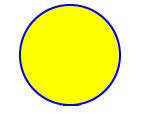
<circle cx="200" cy="100" r="50" stroke="blue"
stroke-width="2" fill="yellow"/>
</svg>
O/P:


Explanation of the above code

The first line is the XML declaration. Notice the standalone attribute! This attribute specifies whether the SVG file "stands alone", or contains reference to an external file.

standalone="no" means that the SVG document has a reference to an external file, the DTD.

The second and the third line refers to the external SVG DTD. The DTD is located in "http://www.w3.org/Graphics/SVG/1.1/DTD/svg11.dtd". The DTD resides at the W3C and it contains all SVG elements.

The SVG code always begins with the <svg> element, which consists of the opening <svg> tag and the closing </svg> tag. This is the root element. The width and height attributes sets the width and height of the SVG document. The version attribute defines the SVG version to be used and the xmlns attribute define the SVG namespace.

The SVG <circle> element is used to create a circle. The cx and cy attributes define the x and y coordinate of the center of the circle. If cx and cy are omitted then the circle's center is set to (0, 0). The r attribute defines the radius of circle.

The stroke and stroke-width attributes control how the outline of a shape appear. We set the outline of the circle to a 2px wide, blue "border".

The fill attribute refers to color inside a shape. We set the fill color to yellow.

The closing </svg> tag close the root SVG element and the document.

Note: All opening tags always have closing tags


Previous Next

Keywords: svg viewer, svg file, svg text, svg editor, adobe svg, svg distribution, svg graphics, nbc radio svg, javascript svg, svg antivirus


HTML Quizes
HTML Quiz
XHTML Quiz
CSS Quiz
TCP/IP Quiz
XML Quizes
XML Quiz
XSL Quiz
XSLT Quiz
DTD Quiz
Schema Quiz
XForms Quiz
XSL-FO Quiz
XML DOM Quiz
XLink Quiz
XQuery Quiz
XPath Quiz
XPointer Quiz
RDF Quiz
SOAP Quiz
WSDL Quiz
RSS Quiz
WAP Quiz
Web Services Quiz
Browser Scripting Quizes
JavaScript Quiz
VBScript Quiz
AJAX Quiz
DHTML Quiz
HTML DOM Quiz
WMLScript Quiz
E4X Quiz
Server Scripting Quizes
ASP Quiz
PHP Quiz
PERL Quiz
SQL Quiz
ADO Quiz
.NET (dotnet) Quizes
Microsoft.Net Quiz
XML Web Services Quiz
ASP.Net Quiz
.Net Mobile Quiz
C# : C Sharp Quiz
ADO.NET Quiz
VB.NET Quiz
Multimedia Quizes
SVG Quiz
Flash Quiz
Media Quiz
SMIL Quiz
Web Building  Quizes
Web Browsers Quiz
Web Hosting Quiz
W3C Quiz
Web Building Quiz
Web Quality Quiz
Web Semantic Quiz
Web Careers Quiz
Java Quizes
Java Quiz
JSP Quiz
Servlets Quiz
Struts Quiz
EJB Quiz
JMS Quiz
JMX Quiz
Programming Langauges Quizes
C Quiz
C++ Quiz
Visual Basic Quiz
Data Structures Using C Quiz
Soft Skills Quizes
Communication Skills Quiz
Time Management Quiz
Project Management Quiz
Team Work Quiz
Leadership Skills Quiz
Corporate Communication Quiz
Negotiation Skills Quiz

Privacy Policy
Copyright © 2003-2008 Vyom Technosoft Pvt. Ltd., All Rights Reserved.