Academic Tutorials


English | French | Portugese | Dutch | Italian
Google

on-line

Haupt Quellenprogramme E-Bücher Downloads Mit uns in Verbindung treten Über uns

HTML Tutorials
HTML Tutorial
XHTML Tutorial
CSS Tutorial
TCP/IP Tutorial
XML Tutorials
XML Tutorial
XSL Tutorial
XSLT Tutorial
DTD Tutorial
Schema Tutorial
XForms Tutorial
XSL-FO Tutorial
XML DOM Tutorial
XLink Tutorial
XQuery Tutorial
XPath Tutorial
XPointer Tutorial
RDF Tutorial
SOAP Tutorial
WSDL Tutorial
RSS Tutorial
WAP Tutorial
Web Services Tutorial
Browser Scripting
JavaScript Tutorial
VBScript Tutorial
AJAX Tutorial
DHTML Tutorial
HTML DOM Tutorial
WMLScript Tutorial
E4X Tutorial
Server Scripting
ASP Tutorial
PHP Tutorial
PERL Tutorial
SQL Tutorial
ADO Tutorial
.NET (dotnet)
Microsoft.Net
XML Web Services
ASP.Net
.Net Mobile
C# : C Sharp
ADO.NET
VB.NET
Multimedia
SVG Tutorial
Flash Tutorial
Media Tutorial
SMIL Tutorial
Web Building
Web Browsers
Web Hosting
W3C Tutorial
Web Building
Web Quality
Web Semantic
Web Careers
Java Tutorials
Java Tutorial
JSP Tutorial
Servlets Tutorial
Struts Tutorial
EJB Tutorial
JMS Tutorial
JMX Tutorial
Programming Langauges
C Tutorial
C++ Tutorial
Visual Basic Tutorial
Data Structures Using C
Soft Skills
Communication Skills
Time Management
Project Management
Team Work
Leadership Skills
Corporate Communication
Negotiation Skills


Schreiben der Codes in VB
Previous Next


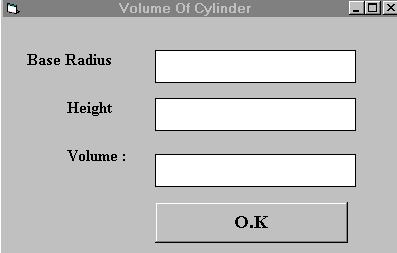
Das Programm folgend errechnen das Volumen eines Zylinders:
Private Sub OK_Click( )
r = Val(radius.Text)
h = Val(hght.Text)
pi = 22 / 7
v = pi * (r ^ 2) * h
volume.Text= Str$(v)
End Sub

Note:doubleclick on the O.K button and enter the codes between Private Sub OK_Click( ) and then End Sub
Now we have written the codes for the cylinder program which is given above I shall attempt to explain the above source program to newcomers in Visual Basic( If you are a veteran, you can skip this part) and let me describe the steps using pseudocodes as follows:

Procedure to calculate the volume of cylinder for clicking the OK button
get the value of r from radius text box
get the value of h from height text box
assign a constant value 22/7 to the pi
calculate the volume using the formula
output the results to Volume text box
End of Procedure

The syntax radius.Text consists of two parts, radius is the name of text box while Text is the textual contents of the text box and generally, the syntax is: Object.Property In our example, the objects are radius, volume and hght, each having text as their property.Object and property is separated by a period(or dot) and thaen the contents of a text box can only be displayed in textual form, or in programming term,as string.You have to use the function Val to convert the contents of a text box to a numeric value so that mathematical operations can be performed. Finally, In order to display the results in a text box, we have to perform the reverse procedure, that is, to convert the numeric value back to textual form, using the function Str$.

I shall also explain the syntax that defines the sub procedure Private Sub OK_click and Private Sub here means that the parameters ,formulas and values that are used here belong only to the OK subprocedure(an object by itself).They cannot be used by other sub modules or procedures. OK_Click defines that what kind of action the subprocedure OK will response.Here, the action is mouse click and there are other kind of actions like keypress, keyup, keydown and etc that I am going to due with in other lessons.


Previous Next

Schlüsselwörter: Die Codes in VB schreibend, arbeitet grundlegendes sichtlichvb, vb Asp Netz, vb, vb Tutorials, vb Timer, vb Reihe, vb msgbox, das vb, das schwach ist, das byval vb, vb Kontrollen, vb Hinweis, Bezugsschreiben, vb Oberteil, vb Funktion, vb Datum, Schreiben Proben, vb msdn, Schreiben Probe, vb treeview, überbrückercodes, vb Formen, vb API, vb Proben, vb xml, vb Befehl, vb listview, vb Modul


HTML Quizes
HTML Quiz
XHTML Quiz
CSS Quiz
TCP/IP Quiz
XML Quizes
XML Quiz
XSL Quiz
XSLT Quiz
DTD Quiz
Schema Quiz
XForms Quiz
XSL-FO Quiz
XML DOM Quiz
XLink Quiz
XQuery Quiz
XPath Quiz
XPointer Quiz
RDF Quiz
SOAP Quiz
WSDL Quiz
RSS Quiz
WAP Quiz
Web Services Quiz
Browser Scripting Quizes
JavaScript Quiz
VBScript Quiz
AJAX Quiz
DHTML Quiz
HTML DOM Quiz
WMLScript Quiz
E4X Quiz
Server Scripting Quizes
ASP Quiz
PHP Quiz
PERL Quiz
SQL Quiz
ADO Quiz
.NET (dotnet) Quizes
Microsoft.Net Quiz
XML Web Services Quiz
ASP.Net Quiz
.Net Mobile Quiz
C# : C Sharp Quiz
ADO.NET Quiz
VB.NET Quiz
Multimedia Quizes
SVG Quiz
Flash Quiz
Media Quiz
SMIL Quiz
Web Building  Quizes
Web Browsers Quiz
Web Hosting Quiz
W3C Quiz
Web Building Quiz
Web Quality Quiz
Web Semantic Quiz
Web Careers Quiz
Java Quizes
Java Quiz
JSP Quiz
Servlets Quiz
Struts Quiz
EJB Quiz
JMS Quiz
JMX Quiz
Programming Langauges Quizes
C Quiz
C++ Quiz
Visual Basic Quiz
Data Structures Using C Quiz
Soft Skills Quizes
Communication Skills Quiz
Time Management Quiz
Project Management Quiz
Team Work Quiz
Leadership Skills Quiz
Corporate Communication Quiz
Negotiation Skills Quiz

Privacy Policy
Copyright © 2003-2008 Vyom Technosoft Pvt. Ltd., All Rights Reserved.