| Téléchargement de dossier de Struts |
|
Comment télécharger un dossier dans les Struts
|
|
Pour télécharger un dossier, l'interface org.apache.struts.upload.FormFile est employée dans l'application. Représente un dossier qui a été téléchargé par le client, cette interface est employé. C'est la seule classe ou interface dans le paquet de téléchargement qui est typiquement mis en référence directement par une application de Struts
|
| Créer l'haricot de forme
|
|
Dans notre exemple, la classe d'haricot de forme contient une propriété theFile, qui est du type org.apache.struts.upload.FormFile. L'exemple suivant est le code du FormBean (StrutsUploadForm.java) :
|
package academictutorials;
import org.apache.struts.action.*;
import org.apache.struts.upload.FormFile;
/**
* Form bean for Struts File Upload.
*
*/
public class StrutsUploadForm extends ActionForm
{
private FormFile theFile;
/**
* @return Returns the theFile.
*/
public FormFile getTheFile()
{
return theFile;
}
/**
* @param theFile The FormFile to set.
*/
public void setTheFile(FormFile theFile)
{
this.theFile = theFile;
}
}
|
|
| Créer la classe d'action
|
|
Pour rechercher la référence du dossier téléchargé, la classe d'action appelle simplement () la fonction getTheFile sur l'objet de FormBean. Pour obtenir le dossier téléchargé et son information, la référence du FormFile est employée. Ce qui suit est code de notre classe d'action appelée le strutsUploadAction.java :
|
package academictutorials;
import javax.servlet.http.HttpServletRequest;
import javax.servlet.http.HttpServletResponse;
import org.apache.struts.action.Action;
import org.apache.struts.action.ActionForm;
import org.apache.struts.action.ActionForward;
import org.apache.struts.action.ActionMapping;
import org.apache.struts.upload.FormFile;
/**
* Struts File Upload Action Form.
*
*/
public class StrutsUploadAction extends Action
{
public ActionForward execute(
ActionMapping mapping,
ActionForm form,
HttpServletRequest request,
HttpServletResponse response) throws Exception
{
StrutsUploadForm myForm = (StrutsUploadForm)form;
// Process the FormFile
FormFile myFile = myForm.getTheFile();
String contentType = myFile.getContentType();
String fileName = myFile.getFileName();
int fileSize = myFile.getFileSize();
byte[] fileData = myFile.getFileData();
System.out.println("contentType: " + contentType);
System.out.println("File Name: " + fileName);
System.out.println("File Size: " + fileSize);
return mapping.findForward("success");
}
}
|
|
| Définir l'haricot de forme dans le dossier de struts-config.xml
|
|
Dans le dossier de struts-config.xml pour définir l'haricot de forme, ajouter l'entrée suivante.
|
|
<form-bean
name="FileUpload" type="academictutorials.StrutsUploadForm"/>
|
|
| Définir tracer d'action
|
| Dans le dossier de struts-config.xml, ajouter l'action suivante traçant l'entrée :
|
<action
path="/FileUpload"
type="academictutorials.StrutsUploadAction"
name="FileUpload"
scope="request"
validate="true"
input="/pages/FileUpload.jsp">
<forward name="success" path="/pages/uploadsuccess.jsp"/>
</action>
|
|
| Page se développante de jsp
|
|
Le code du dossier du jsp (FileUpload.jsp) à télécharger est comme suit :
|
<%@ taglib uri="/tags/struts-bean" prefix="bean" %>
<%@ taglib uri="/tags/struts-html" prefix="html" %>
<html:html locale="true">
<head>
<title>Struts File Upload Example</title>
<html:base/>
</head>
<body bgcolor="white">
<html:form action="/FileUpload" method="post" enctype="multipart/form-data">
<table>
<tr>
<td align="center" colspan="2">
<font size="4">Please Enter the Following Details</font>
</tr>
<tr>
<td align="left" colspan="2">
<font color="red"><html:errors/></font>
</tr>
<tr>
<td align="right">
File Name
</td>
<td align="left">
<html:file property="theFile"/>
</td>
</tr>
<tr>
<td align="center" colspan="2">
<html:submit>Upload File</html:submit>
</td>
</tr>
</table>
</html:form>
</body>
</html:html>
|
|
|
Noter que nous avons placé la propriété de chiffrage de la forme à l'enctype= " de liasse multiple/forme-données ".
Le code suivant pour la page de succès (uploadsuccess.jsp) est comme suit :
|
<html>
<head>
<title>Success</title>
</head>
<body>
<p align="center"><font size="5" color="#000080">File Successfully
Received</font></p>
</body>
</html>
|
|
|
Dans index.jsp pour appeler la forme, ajouter la ligne suivante.
|
<li>
<html:link page="/pages/FileUpload.jsp">Struts
File Upload</html:link>
<br>
Example shows you how to Upload File with
Struts.
</li>
|
|
| Exemple et essai de bâtiment
|
|
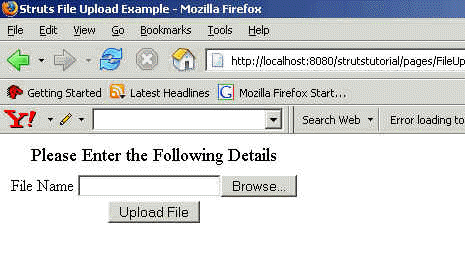
Aller aux Struts \ à annuaire strutstutorial et dactylographier la fourmi sur le message de sollicitation de commande, à la construction et déployer l'application. Ceci aidera à déployer l'application. Ouvrir le navigateur et dactylographier la page de FileUpload.jsp. Votre navigateur devrait montrer la forme de téléchargement de dossier comme suit :
|
|
Keywords:
struts file upload,file upload struts,struts source code,struts web xml,file upload in struts,jsp file upload,java file,struts tutorial,servlet file upload,java struts,html file upload,jakarta file upload,jsf file upload,javascript file upload,struts examples,struts api,struts tags,struts jakarta,struts apache,apache file upload
|


