Like many other programming languages, C programs read in (input) or write out (output) characters.
A D V E R T I S E M E N T
Of note is that most any underlying computer (executing C code) also generally has a mechanism by which a single character may be input or output. This input or output of a single character will often be the only way for a program to accomplish I/O functionality.
Character Input / Output
The functions getc() and putc() are much the same. The difference between these and getchar() and putchar() are an extra parameter that identifies a file (through the use of a file descriptor or file pointer) for input to come from, or output to go to. The structure FILE defined in gives access to file pointers and files.
getchar
putchar
getchar
getchar always returns the next character of keyboard input as an int.
The EOF (end of file) is returned,if there is an error .
It is usual to compare this value against EOF before using it.
So error conditions will not be handled correctly,if the return value is stored in a char, it will never be equal to EOF.
The following program is used to count the number of characters read until an EOF is encountered. EOF can be generated by typing Control - d.
#include <stdio.h>
main()
{ int ch, i = 0;
while((ch = getchar()) != EOF)
i ++;
printf("%d\n", i);
}
putchar
putchar puts its character argument on the standard output (usually the screen).
The following example program converts any typed input into capital letters.It applies the function toupper from the character conversion library ctype.h to each character in turn to do this.
#include <ctype.h> /* For definition of toupper */
#include <stdio.h> /* For definition of getchar, putchar, EOF */
This offers more structured output than the putchar.
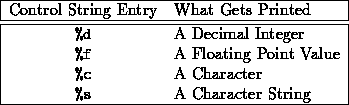
Its arguments are, in order; a control string, which controls what get printed,
followed by a list of values to be substituted for entries in the control string.
The prototype for the printf() is:
int printf(const char *format, ...);
To print,printf takes in a formatting string and the actual variables . An example of printf is:
int x = 5;
char str[] = "abc";
char c = 'z';
float pi = 3.14;
We have already seen that printf handles formatted output to stdout. The counterpart statement for reading from stdin is scanf. The syntax
scanf("format string", variables);
resembles that of printf. The format string may contain blanks or tabs (ignored), ordinary ASCII characters, which must match those in stdin, and conversion specifications as in printf.
Equivalent statements exist to read from or write to character strings. They are:
sprintf(string, "format string", variables);
scanf(string, "format string", variables);
The ``string'' argument is the name of (i.e. a pointer to) the character array into which you want to write the informatio
printf("%10.4d", x);
The . allows for the precision.To floats as well,this can be applied.The number 5 is on the tenth spacing as the number 10 puts 0005 over 10 spaces. You can also add - and + right after % to make the number explicitly output as +0005. Note that the value of x does not actually change. In other words,you will not get output using %-10.4d will not output -0005.
%e is useful for outputting floats using the scientific notation. %le for doubles and %Le for the long doubles.
To grab things from input,scanf() is used. Beware though, scanf isn't greatest function that C has to offer. Some people brush off the scanf as a broken function that shouldn't be used often.
The prototype for scanf is:
Last example will create a rectangle with rounded corner:
int scanf( const char *format, ...);
To read of data from the keyboard,scanf allows formatted .
Like printf it has a control string,followed by the list of items to be read.
However scanf wants to know the address of items to be read, since it is a function which will change that value. Therefore the names of variables are preceeded by the & sign. Character strings are an exception to this. Since a string is already a character pointer, we give the names of the string variables unmodified by a leading &.
Control string entries which match values to be read are preceeded by the percentage sign in a similar way to their printf equivalent.
Looks similar to printf, but doesn't completely behave like the printf does. Take the example:
scanf("%d", x);
For grabbing things from input. Beware though, scanf isn't the greatest function that C has to offer,scanf() is used.
Share And Enjoy:These icons link to social bookmarking sites where readers can share and discover new web pages.
Keywords:
c tutorial,
c arrays,
c atoi,
c array,
void c,
c syntax,
functions math,
c time,
c language,
c examples,
format c,
return c,
c library,
array functions,
c programs,
ansi c,
standard c,
c msdn,
c algorithm,
c example,
variable functions,
c program,
functions variables,
unix c,
variable c,
c type,