Instrument your applications, services, or devices for
manageability is much simple when JMX used.
A D V E R T I S E M E N T
JMX technology shares Java's object
model. If you are already familiar with Java and JavaBeans component model, you
know 95% of all you need to know.
Basic Application
This basic application manages a resource which create a simple standard
MBean that exposes a String object and an operation.
First of all to develop the MBean interface.
This application consist
interface called HelloMBean, which declares three methods: one
getter, one setter, and one for saying hello as shown in Code Example 1.
Example 1: HelloMBean.java
public interface HelloMBean {
public void setMessage(String message);
public String getMessage();
public void sayHello();
}
Next step is to apply the MBean interface. A example is
shown in the following code.
Example 2: Hello.java
public class Hello implements HelloMBean {
private String message = null;
public Hello() {
message = "Hello there";
}
public Hello(String message) {
this.message = message;
}
public void setMessage(String message) {
this.message = message;
}
public String getMessage() {
return message;
}
public void sayHello() {
System.out.println(message);
}
}
By this way your first MBean created. The next step is to test
the MBean, by developing a JMX agent in which you register the MBean. A JMX agent
acts as a container for the MBean and it is a component in the agent level. A
sample agent, SimpleAgent, is provided in Example 3. This agent
performs the following tasks:
public class SimpleAgent {
private MBeanServer mbs = null;
public SimpleAgent() {
// Get the platform MBeanServer
mbs = ManagementFactory.getPlatformMBeanServer();
// Unique identification of MBeans
Hello helloBean = new Hello();
ObjectName helloName = null;
try {
// Uniquely identify the MBeans and register them with the platform MBeanServer
helloName = new ObjectName("SimpleAgent:name=hellothere");
mbs.registerMBean(helloBean, helloName);
} catch(Exception e) {
e.printStackTrace();
}
}
// Utility method: so that the application continues to run
private static void waitForEnterPressed() {
try {
System.out.println("Press to continue...");
System.in.read();
} catch (Exception e) {
e.printStackTrace();
}
}
public static void main(String argv[]) {
SimpleAgent agent = new SimpleAgent();
System.out.println("SimpleAgent is running...");
SimpleAgent.waitForEnterPressed();
}
}
The java.lang.management.ManagementFactory class is a factory
class for getting managed beans for the Java platform. In this example, the
getPlatformMBeanServer() method is used to get the platform
MBeanServer, which is the interface for MBean manipulation on the agent side. It
contains the methods necessary for the registration, creation and deletion of
MBeans. The MBeanServer is the core component of the JMX agent infrastructure.
To test with this application follow this step:
Create a directory of your choice (such as jmx-example)
Copy Code Samples 1, 2, and 3 into that directory
By using javac compile the .java extension file
Execute SimpleAgent. In order to use the jconsole
tool to manage it, you should run the SimpleAgent as follows:
Note: The -Dcom.sun.management.jmxremote system
property creates an RMI connector to the platform MBeanServer.
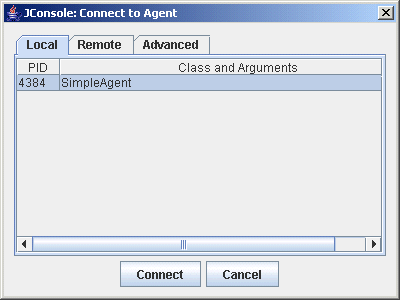
By using the jconsole tool connect to the JMX agent. Execute the
jconsole tool from the command line. Once you start
jconsole, it will display the list of local processes to be monitored
as shown in Figure 2.
Figure 2: The jconsole monitoring tool
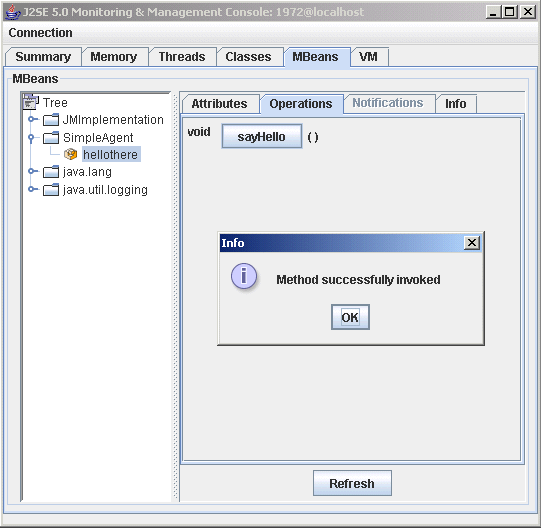
6. Now, you can connect to the service. Once connected, select the MBeans
tab so that you can list the MBeans and manage them as shown in Figure 3.
Figure 3: The MBeans tab of jconsole
Note that local monitoring with jconsole is useful for
development and prototyping. But it is not recommended that jconsole be used locally
for production environments as it consumes significant system resources.
jconsole should be used on a remote system from the platform being monitored.