Academic Tutorials


English | French | Portugese | German | Italian
Google

Home Source Codes E-Books Downloads Contact Us About Us

Struts Tutorial
Struts Introduction
Struts Controller
Struts Action Class
Struts ActionForm Class
Struts HTML Tags
Struts Validator Framework
Struts ClientSide Address Valiadation
Struts Tiles
Using tiles-defs.xml
Dynamic Action Form
Struts File Upload
Struts Database Connection

HTML Tutorials
HTML Tutorial
XHTML Tutorial
CSS Tutorial
TCP/IP Tutorial
XML Tutorials
XML Tutorial
XSL Tutorial
XSLT Tutorial
DTD Tutorial
Schema Tutorial
XForms Tutorial
XSL-FO Tutorial
XML DOM Tutorial
XLink Tutorial
XQuery Tutorial
XPath Tutorial
XPointer Tutorial
RDF Tutorial
SOAP Tutorial
WSDL Tutorial
RSS Tutorial
WAP Tutorial
Web Services Tutorial
Browser Scripting
JavaScript Tutorial
VBScript Tutorial
AJAX Tutorial
DHTML Tutorial
HTML DOM Tutorial
WMLScript Tutorial
E4X Tutorial
Server Scripting
ASP Tutorial
PHP Tutorial
PERL Tutorial
SQL Tutorial
ADO Tutorial
.NET (dotnet)
Microsoft.Net
XML Web Services
ASP.Net
.Net Mobile
C# : C Sharp
ADO.NET
VB.NET
Multimedia
SVG Tutorial
Flash Tutorial
Media Tutorial
SMIL Tutorial
Web Building
Web Browsers
Web Hosting
W3C Tutorial
Web Building
Web Quality
Web Semantic
Web Careers
Java Tutorials
Java Tutorial
JSP Tutorial
Servlets Tutorial
Struts Tutorial
EJB Tutorial
JMS Tutorial
JMX Tutorial
Programming Langauges
C Tutorial
C++ Tutorial
Visual Basic Tutorial
Data Structures Using C
Soft Skills
Communication Skills
Time Management
Project Management
Team Work
Leadership Skills
Corporate Communication
Negotiation Skills


Struts File Upload
Previous Next


How to Upload a file in Struts

To upload a file,the interface org.apache.struts.upload.FormFile is used in the application. To represents a file that has been uploaded by the client,this interface is used. It is the only class or interface in the upload package which is typically referenced directly by a Struts application


Creating Form Bean

In our example,the form bean class contains one property theFile, which is of type org.apache.struts.upload.FormFile. The following example is the code of the FormBean (StrutsUploadForm.java):

package academictutorials;

import org.apache.struts.action.*;
import org.apache.struts.upload.FormFile;

/**
* Form bean for Struts File Upload.
*
*/
public class StrutsUploadForm extends ActionForm
{
private FormFile theFile;

/**
* @return Returns the theFile.
*/
public FormFile getTheFile()
{
return theFile;
}
/**
* @param theFile The FormFile to set.
*/
public void setTheFile(FormFile theFile)
{
this.theFile = theFile;
}
}


Creating Action Class

To retrieve the reference of the uploaded file,the action class simply calls getTheFile() function on the FormBean object. To get uploaded file and its information, the reference of the FormFile is used . The following is code of our action class called strutsUploadAction.java:

package academictutorials;

import javax.servlet.http.HttpServletRequest;
import javax.servlet.http.HttpServletResponse;

import org.apache.struts.action.Action;
import org.apache.struts.action.ActionForm;
import org.apache.struts.action.ActionForward;
import org.apache.struts.action.ActionMapping;
import org.apache.struts.upload.FormFile;

/**
* Struts File Upload Action Form.
*
*/
public class StrutsUploadAction extends Action
{
public ActionForward execute(
ActionMapping mapping,
ActionForm form,
HttpServletRequest request,
HttpServletResponse response) throws Exception
{
StrutsUploadForm myForm = (StrutsUploadForm)form;

// Process the FormFile
FormFile myFile = myForm.getTheFile();
String contentType = myFile.getContentType();
String fileName = myFile.getFileName();
int fileSize = myFile.getFileSize();
byte[] fileData = myFile.getFileData();
System.out.println("contentType: " + contentType);
System.out.println("File Name: " + fileName);
System.out.println("File Size: " + fileSize);

return mapping.findForward("success");
}
}


Defining form Bean in struts-config.xml file

In struts-config.xml file for defining the form bean,add the following entry.

<form-bean name="FileUpload" type="academictutorials.StrutsUploadForm"/>


Defining Action Mapping
In struts-config.xml file,add the following action mapping entry :
<action
path="/FileUpload"
type="academictutorials.StrutsUploadAction"
name="FileUpload"
scope="request"
validate="true"
input="/pages/FileUpload.jsp">
<forward name="success" path="/pages/uploadsuccess.jsp"/>
</action>


Developing jsp page

Code of the jsp (FileUpload.jsp) file to upload is as follows:

<%@ taglib uri="/tags/struts-bean" prefix="bean" %>
<%@ taglib uri="/tags/struts-html" prefix="html" %>

<html:html locale="true">
<head>
<title>Struts File Upload Example</title>
<html:base/>
</head>
<body bgcolor="white">
<html:form action="/FileUpload" method="post" enctype="multipart/form-data">
<table>
<tr>
<td align="center" colspan="2">
<font size="4">Please Enter the Following Details</font>
</tr>

<tr>
<td align="left" colspan="2">
<font color="red"><html:errors/></font>
</tr>


<tr>
<td align="right">
File Name
</td>
<td align="left">
<html:file property="theFile"/> 
</td>
</tr>


<tr>
<td align="center" colspan="2">
<html:submit>Upload File</html:submit>
</td>
</tr>
</table>


</html:form>
</body>
</html:html>

Note that we have set the encrypt property of form to enctype="multipart/form-data".

The following code for the success page (uploadsuccess.jsp) is as follows:

<html>

<head>
<title>Success</title>
</head>

<body>

<p align="center"><font size="5" color="#000080">File Successfully Received</font></p>

</body>

</html>


In index.jsp to call the form,add the following line.

<li>
<html:link page="/pages/FileUpload.jsp">Struts File Upload</html:link>
<br>
Example shows you how to Upload File with Struts.
</li>


Building Example and Testing

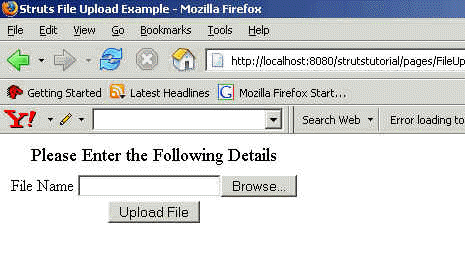
Go to Struts\strutstutorial directory and type ant on the command prompt,to build and deploy application. This will help to deploy application. Open the browser and type FileUpload.jsp page. Your browser should display the file upload form as follows:



Share And Enjoy:These icons link to social bookmarking sites where readers can share and discover new web pages.
  • blinkbits
  • BlinkList
  • blogmarks
  • co.mments
  • connotea
  • del.icio.us
  • De.lirio.us
  • digg
  • Fark
  • feedmelinks
  • Furl
  • LinkaGoGo
  • Ma.gnolia
  • NewsVine
  • Netvouz
  • RawSugar
  • Reddit
  • scuttle
  • Shadows
  • Simpy
  • Smarking
  • Spurl
  • TailRank
  • Wists
  • YahooMyWeb

Previous Next

Keywords: struts file upload,file upload struts,struts source code,struts web xml,file upload in struts,jsp file upload,java file,struts tutorial,servlet file upload,java struts,html file upload,jakarta file upload,jsf file upload,javascript file upload,struts examples,struts api,struts tags,struts jakarta,struts apache,apache file upload


HTML Quizes
HTML Quiz
XHTML Quiz
CSS Quiz
TCP/IP Quiz
XML Quizes
XML Quiz
XSL Quiz
XSLT Quiz
DTD Quiz
Schema Quiz
XForms Quiz
XSL-FO Quiz
XML DOM Quiz
XLink Quiz
XQuery Quiz
XPath Quiz
XPointer Quiz
RDF Quiz
SOAP Quiz
WSDL Quiz
RSS Quiz
WAP Quiz
Web Services Quiz
Browser Scripting Quizes
JavaScript Quiz
VBScript Quiz
AJAX Quiz
DHTML Quiz
HTML DOM Quiz
WMLScript Quiz
E4X Quiz
Server Scripting Quizes
ASP Quiz
PHP Quiz
PERL Quiz
SQL Quiz
ADO Quiz
.NET (dotnet) Quizes
Microsoft.Net Quiz
XML Web Services Quiz
ASP.Net Quiz
.Net Mobile Quiz
C# : C Sharp Quiz
ADO.NET Quiz
VB.NET Quiz
Multimedia Quizes
SVG Quiz
Flash Quiz
Media Quiz
SMIL Quiz
Web Building  Quizes
Web Browsers Quiz
Web Hosting Quiz
W3C Quiz
Web Building Quiz
Web Quality Quiz
Web Semantic Quiz
Web Careers Quiz
Java Quizes
Java Quiz
JSP Quiz
Servlets Quiz
Struts Quiz
EJB Quiz
JMS Quiz
JMX Quiz
Programming Langauges Quizes
C Quiz
C++ Quiz
Visual Basic Quiz
Data Structures Using C Quiz
Soft Skills Quizes
Communication Skills Quiz
Time Management Quiz
Project Management Quiz
Team Work Quiz
Leadership Skills Quiz
Corporate Communication Quiz
Negotiation Skills Quiz

Privacy Policy
Copyright © 2003-2008 Vyom Technosoft Pvt. Ltd., All Rights Reserved.