There are three ways by which we can place Javascript for use in a web page.
1. Inside the head section.
2. Within the body section.
3. In an external file.
1. Inside the head section
Java Scripts in the body section will be executed while the page loads.
Scripts that contains function go in the head section of the document. Then we can sure that the script is load before the function is called.
Example:1
<html>
<head>
<script type="text/javascript">
function message()
{
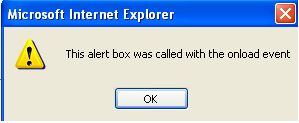
alert("This alert box was called with the onload event")
}
</script>
</head>
<body onload="message()">
</body>
</html>
Output
Within an HTML document the <script> tag can be placed any number of times, it is like any other tag, and like most tags <script>has to be ended with </script>. As soon as the Javascript code is loaded into the browser it is executed, sometimes we may not want that. In cases like that when the script is executed when called (most often functions) we place it in the head section.
Scripts to be executed when the page loads go in the body section. When you place a script in the body section it generates the content of the page.
Example:3
Will execute when the page loads (when the body section of the page is reached).
<html>
<head>
</head>
<body>
<script type="text/javascript">
document.write("This message is Display when the page loads")
</script>
</body>
</html>
Output
This message is Display when the page loads
JavaScripts in both the body and the head section of the HTML page:
You can place an unlimited numbers of Java Scripts in your HTML page or document, so you can have scripts in both the body and the head section of HTML page.
Example:4
<html>
<head>
<script type="text/javascript">
some statements
</script>
</head>
<body>
<script type="text/javascript">
some statements
</script>
</body>
</html>
3. In an external file
A script section placed in either the head section or body section, links to an external javascript file.
Save the file with a ".js" file extension and include everything inside the script tags. For example:
document.write("Vyom Technosoft, from an external javascript file!")
The external script cannot contain the <script> tag!
Example:5
<html>
<head>
<script type="text/javascript" src="vyomscript1.js">
some statements
</script>
</head>
<body>
<script type="text/javascript" src="vyomscript2.js">
some statements
</script>
</body>
</html>
Share And Enjoy:These icons link to social bookmarking sites where readers can share and discover new web pages.