To ensure security of data transported and routed through HTTP, LDAP or POP3 application layers,the SSL protocol was originally developed by Netscape. SSL is designed to make use of TCP as a communication layer to provide a reliable end-to-end secure and authenticated connection between two points over a network (for example between the service client and the server).
A D V E R T I S E M E N T
Notwithstanding this SSL can be used for protection of data in transit in situations related to any network service and it is used mostly in HTTP server and client applications.
Today, almost each available HTTP server can support an SSL session, whilst Netscape Navigator or IE browsers are provided with SSL-enabled client software.
Objectives of SSL
Authenticating the client and server to each other:
to authenticate the communicating parties to each other,the SSL protocol supports the use of standard key cryptographic techniques (public key encryption). Though the most frequent application consists in authenticating the service client on the basis of a certificate and SSL may also use the same methods to authenticate the client.
Ensuring data integrity:
during a session, data cannot be either unintentionally or intentionally tampered with.
Securing data privacy:
data in transport between the server and the client must be protected from interception and be readable only by the intended recipient. This prerequisite is necessary for both the data associated with the protocol itself (securing traffic during negotiations) and the application data that is sent during the session itself and SSL is in fact not a single protocol but rather a set of protocols that can additionally be further divided in two layers:
<
b>the protocol to ensure data security and integrity:
this layer is composed of SSL Record Protocol
the protocols that are designed to establish an SSL connection:
three protocols are used in this layer: the SSL Handshake Protocol,the SSL Alert Protocol and the SSL ChangeCipher SpecPprotocol.
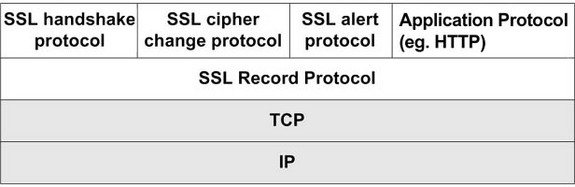
The SSL protocol stack is illustrated in the following figure:
To address the tasks as described above,SSL uses these protocols.
The SSL record protocol is responsible for data integrity and encryption. As can be seen in above figure, it is also used to encapsulate data sent by other SSL protocols, and therefore, it is also involved in the tasks associated with the SSL check data.
The other three protocols cover the areas of session management, cryptographic parameter management and transfer of SSL messages between the client and the server and prior to going into a more detailed discussion of the role of individual protocols and their functions let us describe two fundamental concepts related to the use of SSL.
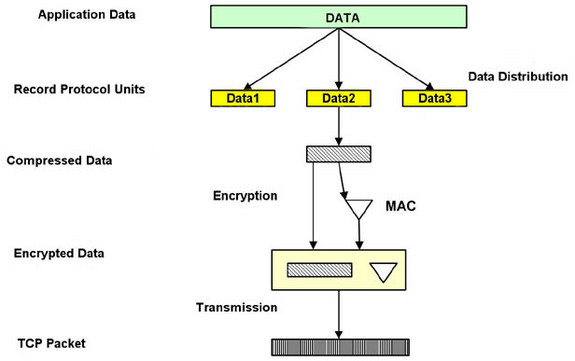
The following figure illustrate the creation of a packet under SSL record protocol
The SSL Record protocol
To transfer any data within a session - both messages and other SSL protocols (for example the handshake protocol), as well as for any application data,the SSL record protocol is used.
The Alert Protocol
The Alert Protocol is used by parties to convey session messages associated with data functioning and exchange of the protocol. Each message in the alert protocol consists of two bytes and the first byte always takes a value, �warning� (1) or �fatal� (2) , that determines the severity of the message sent. Sending a message having a �fatal� status by either party will result in an immediate termination of the SSL session. The next byte of the message contains one of the defined error code, which may occur during an SSL communication session.
The ChangeCipher Spec protocol
This protocol is the simplest SSL protocol. It consists of a single message that carries the value of 1. The sole purpose of this message is to cause the pending session state to be established as a fixed state, which results, for example, in defining the used set of protocols. This type of message must be sent by the client to the server and vice versa. After exchange of messages, the session state is considered agreed. This message and any other SSL messages are transferred using the SSL record protocol.
The handshake protocol
The handshake protocol constitutes the most complex part of the SSL protocol and it is used to initiate a session between the server and the client. Within the message of this protocol, various components such as keys and algorithms used for data encryption are negotiated. Due to this protocol, it is possible to authenticate the parties to each other and negotiate appropriate parameters of the session between them.
The process of negotiations between the server and the client is illustrated in the above figure. It can be divided into 4 phases separated with horizontal broken lines and during the first phase, a logical connection must be initiated between the client and the server followed by the negotiation on the connection parameters. The client sends the server a client_hello message containing data such as:
Version:
which is the highest SSL version supported by the client
Random: which specifies data consisting of a 32-bit timestamp and 28 bytes of randomly generated data. This data is used to protect the key exchange session between the parties of the connection.
Session ID:
which specifies a number that defines the session identifier. A nonzero value of this field indicates that the client wishes to update the parameters of an existing connection or establish a new connection on this session. A zero value in this field indicates that the client wishes to establish a new connection.
CipherSuite: which specifies a list of encryption algorithms and key exchange method supported by the client.
SMTP(Simple Mail Transfer Protocol)
SMTP or Simple Mail Transfer Protocol is a way to transfer email efficiently and reliably.
SMTP is a relatively simple and text-based protocol, where one or more recipients of a message are specified (and in most cases verified to exist) and then the message text is transferred.
To communicate among themselves,you can think of SMTP as the language that mail servers use it.
The SMTP Model
The exchange of mail using TCP/IP is performed by a message transfer agent (MTA) and users normally don?t deal with the MTA.
To set up the local MTA,the system administrator is responsible. The SMTP protocol describes how two In the Internet Protocol stack,MTAs communicate with each other using the single TCP connection.
The SMTP standard is one of the most widely used upper layer protocols ans as its name implies, it is a protocol that defines how to transmit messages (mail) between two users.
SMTP uses the concept of spooling and the idea of spooling is to allow mail to be sent from a local application to the SMTP application, which stores the mail in some device or memory. Once the mail has arrived at the spool, it has been queued. A server checks to see if any messages are available and then attempts to deliver them and if the user is not available for delivery, the server may try later. Eventually, if the mail cannot be delivered, it will be discarded or perhaps returned to the sender. This is known as an end-to-end delivery system, because the server is attempting to contact the destination to deliver, and it will keep the mail in the spool for the a period of time until it has been delivered.
SMTP is found in the two RFCs. RFC 822 describes the structure for the message, which includes the envelope as well and RFC 821 specifies the protocol that controls the exchange of mail between two machines.
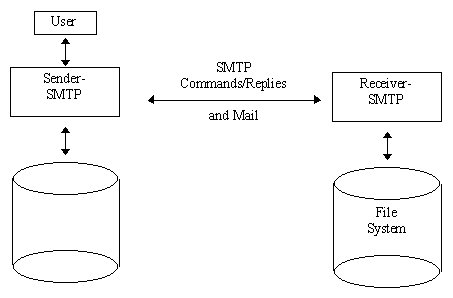
The figure below illustrates a general model of SMTP.
SMTP Commands
The MAIL command identifies the originator of message.
The next command, RCPT, identifies the recipient and more than one RCPT command can be issued if there are multiple recipients.
The contents of the mail message are sent by the client using the DATA command and the final command, QUIT, terminates the mail exchange.
Those were the commands used in the above examples, but SMTP has a few more commands:
The RSET command causes both ends to reset and aborts the current mail transaction. Any stored information about sender and recipients or mail data is discarded.
The VRFY command lets the client ask the sender to verify a recipients address, without sending mail to the recipient and it's often used by a system administrator, by hand, for debugging mail delivery problems.
The NOOP command does nothing besides force the server to respond with an OK with a reply code (200).
EXPN expands a mailing list, and is often used by the system administrator and similar to VRFY.
The TURN command lets the server and client switch roles, to send mail in the reverse direction, without having to take down the TCP connection and create a new one.
Three more commands are available but rarely implemented: SEND,SAML, and SOML. They replace the MAIL command and allow combinations of the mail being delivered directly to the users terminal (if logged in), or sent to the recipient?s mailbox.
For further detailed information about SMTP commands look at the extensive look at SMTP command.
Share And Enjoy:These icons link to social bookmarking sites where readers can share and discover new web pages.
Keywords:
SSL and SMTP protocols, yahoo mail smtp, outlook express smtp, smtp mail server, active directory ssl, smtp mail servers, setting up smtp, smtp set up, smtp email account