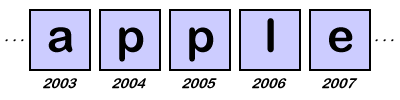
We saw that it is very simple to create data structures that are organized similar to the way the computer's memory is organized. For example, the list of employee's from the ABC company is a linear data structure.
A D V E R T I S E M E N T
Since the computer's memory is also linear, it is very easy to see how we can represent this list with the computer's memory. Any data structure which organizes the data elements one after the other is known as linear data structure. So far we have seen two examples of linear data structures: the string data structure and the ABC company list.
You may have noticed that these two examples of linear data structures resemble to each other. This is because they both are really different kinds of lists. In general, all linear data structures look like the list. However, this does not mean that all the linear data structures are exactly the same. Suppose I want to design a list to store the names of the ABC employees in the computer. One possible design is to organize the names similar to the example picture above. Another possible design is to use the pointers we learned about in the last lesson. While these two designs provide the same functionality the way they are implemented in the computer is much different. This means that there is an abstract view of a list which is distinct from any particular computer implementation
You may have also noticed that the picture of the ABC employees is not as exactly the same as the original list. When we make a list of names, we tend to organize this list into a column rather than a row. In this case, the conceptual or logical representation of a list is the column of names. However, the physical representation of the list in the computer's memory is the row of strings. For most data structures, the way that we think about them is far different from the way they are implemented in the computer. In other words, the physical representation is much different from that of the logical representation, especially in data structures that use pointers.
Ordered List: The Abstract View
The most common linear data structure used is the list. By now you are already pretty familiar with the idea of a list and at least one way of representing a list in the computer. Now we are going to look at a particular kind of list: an ordered list. Ordered lists are very similar to the alphabetical list of employee names for the ABC company. These lists keep items in a specific order such as alphabetical or numerical order. Whenever an item is added to the list, it is placed in the correct sorted position so that the entire list is always sorted.
Before we consider how to implement such a list, we need to consider the abstract view of an ordered list. Since the idea of an abstract view of a list may be a little confusing, let's think about a more familiar example. Consider the abstract view of a television. Regardless of who makes a television, we all expect certain basic things like the ability to change channels and adjust the volume. As long as these operations are available and the TV displays the shows we want to view, we really don't care about who made the TV or how they chose to construct it. The circuitry inside the TV set may be very different from one brand to the next, but the functionality remains the same. Similarly, when we consider the abstract view of an ordered list, we don't worry about the details of implementation. We are only concerned with what the list does, not how it does it.
Suppose we want a list that can hold the following group of sorted numbers: [2 4 6 7]. What are some things that we might want to do with our list? Well, since our list is in order, we will need some way of adding numbers to the list in the proper place, and we will need some way of deleting numbers we don't want from the list. To represent these operations, we will use the following notation:
Each operation has the name and the list of parameters the operation needs. The parameter list for the AddListItem operation includes a list and an item. The RemoveListItem operation is very similar except this time we will specify the item we want to remove. These operations are part of the abstract view of an ordered list. They are what we expect from any ordered list regardless of how it is implemented in the computer's memory.
Array Implementation
One approach to creating a list is simply to reserve a block of adjacent memory cells to large enough to hold the entire list. Such a block of memory is called as array. Of course, since we want to add items to our list, we need to reserve more than just four memory cells. For now, we will make our array large enough to hold as much as six numbers.
Pointer Implementation
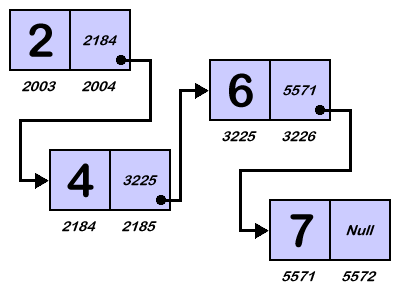
A second approach to creating a list is to link groups of memory cells together using the pointers. Each group of memory cells is called as a node. With this implementation every node contains the data item and the pointer to the next item in the list. You can picture this structure as a chain of nodes linked together by the pointers. As long as we know where the chain begins, we can follow the links to reach any item in the list. Often this structure is called as a linked list.
Notice that the last memory cell in our chain contains the symbol called "Null". This symbol is a special value that tells us that we have reached the end of our list. You can think that this symbol as a pointer that points to nothing. Since we are using the pointers to implement our list, the list operations AddListItem and the RemoveListItem will work differently than they did for sequential lists.
No Data Structures Using C Articles could be found as of now.
Share And Enjoy:These icons link to social bookmarking sites where readers can share and discover new web pages.
Keywords:
linear data structure, c++ structures, java data structures, linear function, trees data structures, graph data structures, tree data structures, linear functions