In this section, we are not going into the technical aspect of VB programming, just have a feel of it and now, you can try out the examples below:
A D V E R T I S E M E N T
Example below is a simple program and first of all, you have to launch Microsoft Visual Basic. Normally,to start your new project,a default form Form1 will be available for you. Now, double click on form1 and then the source code window for form1 will appear. Don't worry about the begining and the end statements(i.e Private Sub Form_Load.......End Sub.) and then just key in the lines in between the above two statements exactly as are shown here.When you run the program, you will be surprise that nothing shown up and in order to display the output of the program, you have to add the Form1.show statement like in Example 1,Example 2 and Example 3. Try it out.
Example 1
Private Sub Form_Load
For i=1 to 5
print "Hello"
next i
End Sub Example 2
Private Sub Form_Load
Form1.show
For i=1 to 5
print "Hello"
next i
End Sub
Example 3
Private Sub Form_Load
Form1.show
For i=1 to10
print i
next i
End Sub
Steps in Building a Visual Basic Application
Step 1At first,draw the interface Step 2Then,set Properties Step 3After that write the events code
Example
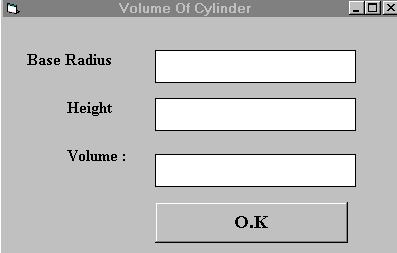
This program is a simple program that calculate the volume of a cylinder. Let design the interface:
At first, go to the properties window and change the form caption to Volume Of Cylinder.
Then draw three label boxes and change their captions to height andvolume, Base Radius respectively.
After that,you get three empty boxes by drawing three Text Boxes and clear its text contents.
Named the text boxes asradius ,hght(we cannot use height as it is the built-in control name of VB)and
volume respectively and lastly, insert a command button and change its caption toO.K. and its name to OK. Now save the project as cylinder.vbp and the form as cylinder.vbp as well and we shall leave out the codes at the moment which you shall learn it in lesson3.