VISUAL BASIC is a high level programming language and it evolved from the earlier DOS version called BASIC.
BASIC means Beginners' All-purpose Symbolic Instruction Code and it is a fairly easy programming language to learn.
A D V E R T I S E M E N T
The codes look a bit like English Language and different software companies produced different version of BASIC, such as Microsoft QBASIC, QUICKBASIC, GWBASIC ,IBM BASICA and so on.
VISUAL BASIC is a events driven and VISUAL Programming Language.
In BASIC, the program is executed sequentially and programming is done in a text-only environment.
In VISUAL BASIC, programming is done in a graphical environment and for this reason users may click on a certain object randomly, so each object has to be programmed independently to be able to response to those actions (events).
VISUAL BASIC Program is made up of many subprograms and each has its own program codes, and each can be executed independently and at the same time each can be linked together in one way or another.
The Development Environment
Learning the outs and ins of the Development Environment before you learn visual basic is somewhat like learning for a test you must know where all the functions belong and what their purpose is and first we will start with labelling the development environment.
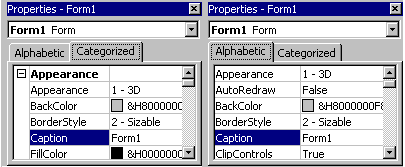
Properties Window
Some programmers prefer the Categorisized view of the properties window and by defaulting, the properties window displays its properties alphabetically (with the exception of the name value)
when you click on the categorized button the window changes to left picture.
The Default Layout
When we start Visual Basic, we are provided with a VB project and a VB
project is a collection of the following files and modules.
The global module( that contains procedures
and declaration)
The form module(that contains the graphic elements of
the VB application and the instruction )
The general module (that generally contains
general-purpose instructions and not pertaining to anything graphic
on-screen)
The class module(that contains the defining
characteristics of a class, including its methods and properties)
The resource files(that allows you to collect
all of the texts and bitmaps for an application in to one place)
On start up, Visual Basic will displays the following windows :
The Properties window
The Project window
The Blank Form window
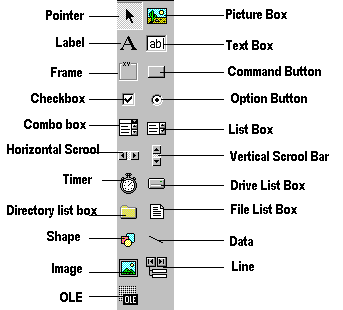
It also includes a Toolbox that consists of all the controls
essential for developing a VB Application and the controls are tools such as
boxes, buttons, labels and other objects draw on a form to get input
or display output. They also add visual appeal in to the form.
Understanding the tool box.
You may have noticed that when you click on different controls the Properties Window changes slightly this is due to different controls having different functions and therefore more options are needed for example if you had a picture then you want to show an image. But if you wanted to open a internet connection you would have to make settings and fill in the remote host.
When you use the command button() you will find that a new set of properties come up and the following will provide a description and a property.
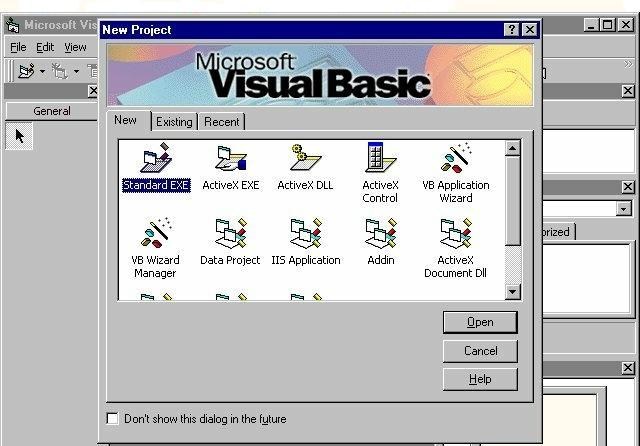
Opening a new visual basic file & Inserting Source code.
It time to make your own application from looking at the examples .At first,choose 'New Project' from the 'File' menu and then use the blank form1 to design a simple interface for an estate agents database, have some textboxes for names and other details. Insert some controls and make it look professional and then textboxes can be used to store there name and other details, make sure you put a picture box in for a picture of the house.Then insert the following source code for your application.
Private Sub Form_Load()
Picture1.Picture = LoadPicture("C:\Program Files\VB\Graphics\Icons\Misc\MISC42.ICO")
End Sub
Running and viewing the project in detail.
Once an application is loaded and then it can be run by clicking on the icon from the toolbar, to pause press and to terminate use .
Once a project is loaded, the name of the form(s) that it contains is displayed in the project window and to view a form in design mode, select the form required by clicking with the mouse to highlight its name, then clicking on the view form button.





 ) you will find that a new set of properties come up and the following will provide a description and a property.
 icon from the toolbar, to pause press
 and to terminate use
 .
.


