In this tutorial you will learn the differences between a fixed-size and dynamic array, how to properly declare each one, how to access them, how to loop through them, how to erase them, and a few other things.
A D V E R T I S E M E N T
This tutorial applies to all versions of Visual Basic, however, versions before Visual Basic 6.0 do not include the split and join function. Below is a list of the major topics that will be discussed
Types of Arrays
Fixed-Size Arrays
A fixed-size array most closely matches our CD rack anology. There are a limited number of slots you can slide CDs into. Pretend you have three CDs - one by the Deftones, another by Tool, and a third by Disturbed. To fit all of these in your rack, the rack must contain at least three slots. So you declare your CD rack as having three slots:
Dim strCDRack(0 to 2) As String
You've just made a variable 'strCDRack' that contains three slots (#0, #1, and #2) and is of a String data type. Now you can insert your CDs into it:
Dim strCDRack(0 to 2) As String
strCDRack(0) = "Deftones"
strCDRack(1) = "Tool"
strCDRack(2) = "Disturbed"
Notice that each of the three new lines starts off with the variable name and then gives an element number before having a value assigned. This is like numbering the slots on your CD rack starting at 0 up to 2 and then inserting a CD into each slot.
The format for declaring an array is:
Dim|Public|Private ArrayName(Subscript) As DataType
- Dim, Public, and Private declare the array and its scope. Using Dim in a procedure will make the array only available from within that procedure. Using it in the General Declarations section will make it available to all procedures in that module. Private has the same effect and should be used only at the modular level. Using Public will make the array available throughout the project.
- ArrayName is the name of the array.
- Subscript is the dimensions of the array.
- DataType is any valid data type.
Dynamic Arrays
The new Charlotte Church CD came out but your rack only has three slots. You don't want to throw away any of your CDs to make room for the new one so you decide to use your ultimate building skills to attach another slot. You start building:
Dim strCDRack() As String
ReDim strCDRack(0 to 2) As String
strCDRack(0) = "Deftones"
strCDRack(1) = "Tool"
strCDRack(2) = "Disturbed"
The general format to declare an array is as follow:
Dim arrayName(subs) as dataType
where subs indicates that the last subscript in the array
The following is an example of using array in VB:
Dim Count(100 to 500) as Integer
declares an array that consists of the ends at Count(500) and first element starting from Count(100)
The following example is a sample program of using array:
Dim studentName(10) As String
Dim num As Integer
Private Sub addName()
For num = 1 To 10
studentName(num) = InputBox("Enter the student name", "Enter Name", "", 1500, 4500)
If studentName(num) <> "" Then
Form1.Print studentName(num)
Else
End
End If
Next
End Sub
Private Sub Exit_Click()
End
End Sub
Private Sub Start_Click()
Form1.Cls
addName
End Sub
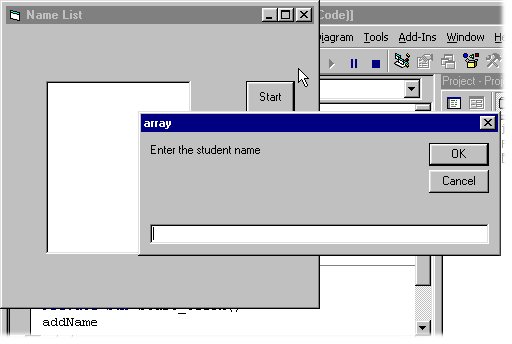
The above program displays the entries in the form itself and accepts data entry through an input box. As you can see, this program will only allows a user to enter 10 names each time he click on the start button and the interface of the above program is as follows:
The above program accepts data entries through an InputBox and displays the items in the form of a list box.
Share And Enjoy:These icons link to social bookmarking sites where readers can share and discover new web pages.
Keywords:
Arrays in VB,
arrays in vb 6.0,
control arrays in vb,
dynamic arrays in vb,
arrays in vb net,
arrays in vb6,
redim in vb,
array in vb net,
array in vb,
visual basic arrays,
arrays in visual basic,
array in vb6,
visual basic net arrays,
visual basic 6 arrays,
string array in vb net,
string array in vb,
dynamic array in vb